What is a VM-Topology
A VM-Topology is a custom PowerShell class containing different elements. It is build from all virtual machines of one host which contain a Tag in their notes field.
It can comprise multiple VM-Environments in which virtual machines can provide VM-Services. The environment also reflects the dependencies between these services.
Example Graph
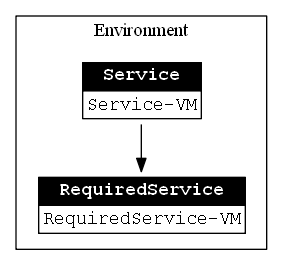
These graph shows a simple VM-Topology containing one environment, one service provided by one VM and one required service provided by one VM.
How to use a VM-Topology with other commands
You can use the VM-Topology to select virtual machines by VM-Service or VM-Environment and use them with commands like Export-VM.
For example, in order to export all virtual machines from the VM-Environment LAB on the localhost use the following:
Export-VM -VM ((Get-VMTopology).Environment | where-object -property name -eq 'LAB').VM